Followers

Monday, September 22, 2014

Bachelor's Degree: Industrial Training Experiences - WEEK 2

September 8, 2014 (Mon)
  • Still on updating ATM Locator area Pahang, Perak and Penang.
  • There are so many area to update (around 600 address). Miss Zara asked we to save the address into the Excell, She said this way more quickly and easier. Mr. Azil can upload to the ATM Locator database (he will generate the geocode and all the data will be update to the server.
  • After finished updating the address then we can  continue focus in Mobile App Development.
September 9, 2014 (Tue)
  • Finished updating ATM Locator for Area Penang and KL. 
  • After Mr. Azril update to the server he ask to check and test the data. 
              -  checking: Several address some ada Longitude / latitude number and ada yang tiada.
  • At the afternoon- New knowledge: learn about "Trello". What's Trello? It's the easiest way to organize anything, like having virtual whiteboards with superpowers.
  • Mr. Noorzaini Ilhami Mohd Noor invites me to join the organization:

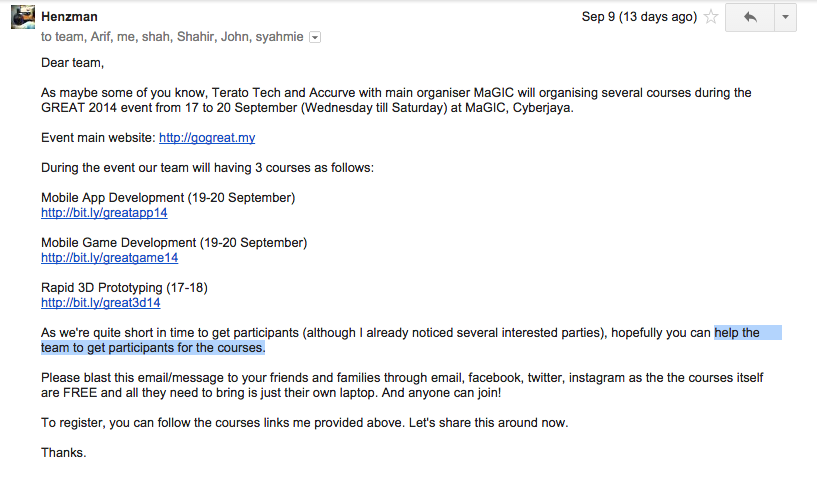
  • Receive an Email from Mr. Henzman, ask to help the team to get participants for the courses.
September 10, 2014 (Wed)
  • Writing weekly report.
  • Have a metting with Mr. Helmi, Mr. Ilhami and Mr. Arif. Miss Zara need our assistance to assist on ATM locator fixes. I was assigned to Android project (ATM Locater )
  • Continue work on the task given (ATM Locater). Had a problem at the webview - ask Mr. Azril to solve it because that problem came from the web server. 
           - fixed for nearby load more error message.
           - fixed for search for bank name and branch name.

September 11, 2014 (Thu)
  • While search the bugs at the ATM Locater App. Mr. Ilhami teach how to use GitHub.
  • Learn new knowledge about GitHub and SourceTree - SourceTree is a free Mercurial and Git Client for Windows and Mac that provides a graphical interface for your Hg and Git repositories. Available at: http://sourcetreeapp.com/ 
September 12, 2014 (Fri)
  • Leave (Brother's wedding at Kedah Darul Aman)
  • Finished work on writing weekly report ( week 2)

Tuesday, September 2, 2014

Bachelor's Degree: Industrial Training Experiences - WEEK 1

September 1, 2014 (Mon)

Ganti cuti Hari Merdeka

September 2, 2014 (Tues)
  • Update blog.
  • Continue learn Eclipse.
  • Error "Type R cannot be resolved to a variable" resolved.
    - I am searching the solution and find the solution at http://stackoverflow.com/.
  • Android - R cannot be resolved to a variable [duplicate] : Go to Project > Properties > Java Build Path > tab [Order and Export] > Tick Android Version Checkbox
    link: 
    http://stackoverflow.com/questions/4932282/android-r-cannot-be-resolved-to-a-variable
  • After trying the solution the error still cannot be resolved.
  • Asking help from new staff. After one week searching the solution "how to solved the error", Mr. Ilhami show that we need to drag and drop the item to the Package Explore . 
  • fuhhhh... malu bertanya sesat jalan.. nasib baik buat tak tau malu p tanya, baru la jumpa jalan... :D kalau tak, stuck kat error tuh jela.. ApapunTakboleh!
  • Continue develop how to "Customize the Tab Indicator".
September 3, 2014 (Wed)
  • Continue develop how to "Customize the Text Color , Customize the Tab Indicator"
  • During the lunch time there are presentation from IBM's representative. Miss Fong Yen give a talk about the "IBM Mobile First Portfolio Highlights - IBM Worklight Overview"
  • After lunch break I was continue to develop simple task that given by Mr. Muszakir, create Android mobile Apps - To do list Apps
September 4, 2014 (Thus)
  • Still continue with created To do list Apps.
  • Done with creating the Action Bar and List View Output. (Mostly refer at http://www.androidhive.info/)
  • while creating the application when get the error i was asking Mr. Ilhami to show me how to solve the error.
  • Continue writing weekly report
September 5, 2014 (Fri)
  • At 11.30am need go to MMU for the SoccerBot Challenge Event, I was continue with updating the ATM Locater Database before go to MMU. 
  • There are 5 state needs to update. ()
    - 1. KL : 212 address
  • - 2. Pahang : 72 address
    - 3. Perak : 76 address
    - 4. Penang : 91 address
    - 5. Selangor : 408 address
  • Go to Multipurpose Hall at MMU, Cyberjaya for the briefing about the event for this Saturday Event.
  • Details of event:
  • Programme Date: SATURDAY, 06/09/2014
    Venue: Multi Purpose Hall, Multimedia University, Cyberjaya
    Activities : Main tournament, Exhibition, Side Events, Bazaar
  • After the briefing we going back to the office at Sungai Merab.
  • Finished work on writing weekly report ( week 1)

7th July 2014 - 2nd Sep 2014


Blog updated. Yes updated, finally.


Yeahh my second industry training. 2014/2015.

As in second picture should be our industry training start 1st September 2014 - 31 January 2015. But Terato Tech Sdn. Bhd. request we to start early. So 7th July 2014 we join Terato Tech.


7th July 2014 - 2nd Sep 2014

The first day of the first week was started at Terato Tech, Selangor, Malaysia. After had welcoming briefing from Mr. Razali, we were assigned to Mr Asyraf as the Internship’s Supervisor. For the first week, Mr Asyraf has given briefing regarding the task that will given on internship’s time. The task are given is to develop games. During the briefing, we was explained about the software are used. For the first day and second day we need to explore and learn about the Unity. " Unity is an entire ecosystem of tools and services designed for people who want to build a successful business by creating multiplatform games and interactive content".

So the job summary for my previous 2month join this company is:

- 1st Week : in this week can be classify as complicated week because in this week still no confirmation place to stay, either house or office and I don't have transportation.

- 2nd Week : Already has a place to stay and dah confirm stay at office di Sg. Merab. (fuhh lega)
- In this week Shahir and me was assigned to Mr. Henzman as the Internship’s Supervisor and Syahmi and Koong De Kai was assigned to Mr Asyraf as their Internship’s Supervisor. We was separated to deferent department, where Shahir and me was assigned to Enterprise department.

  • First day at office Sg. Merab need to update "Menu" at cloud.getslurp.com
  • 11.07.2014 : My first meeting with Boss. Boss as me to write the minute meeting (Slurp :The bugs)
  • 14.07.2014 : Second meeting (still discussing about the bugs )
  • After the second meeting we (Shahir and me ) need to test the Slurp Application and prepare the Test Script for Slurp App. The duration testing the App. and write the Test Script around a week.
Candid photo. Taken by intern Shahir
  • 22.07.2014: At the same-time we also need to update the ATM Locator database.
  • 25th July - 3rd August 2014 : Cuti Raya Aidilfitri weh! 
  • 04.08.2014 : After Eid holiday, we continue updating the ATM Locator database. While updating the ATM database Mr. Helmi asked to help him to do the flowchart, slide, and testing the CIMB Application.
  • 08.08.2014 :  Ms. Zara asked us to learn about the Eclipse ( from developer.android.com ). She ask Mr. Muszakir to give a task to us so that we can learn and create simple android App. 
  •  11 August - 15th August 2014 : continue learn about the Eclipse and build our First App. At the same time continue updating the ATM locator database.
2nd picture also taken by Shahir.
(Shahir tak da kerja.. snap gambar then send kat WhatsApp group. huh!!)
  • got stuck at creating 
  • Styling the Action Bar .
  •  21 August - 25th August 2014- While finding the error Ms. Zara asked to help to testing the CIMB App on the Android and Ipad device. 
  • 27 August - 29 August 2014 : PRA LI at UPNM.


Monday, May 20, 2013

FOSE - Food Services @ Street Education

FOSE - Food Services @ Street Education
" SAVE Rohingya Children "

Briefing sebelum bertolak ke tempat aktiviti.
 Anak-anak Rohingya


adik baju belang tuh langsung tak bercakap.. dia just cuit2 jer suruh tengok dia mewarna.. (teringat terus kak budak kecik dalam CERITA kuch kuch Hota Hai.. sebijik perangai mcm budak tuh) huhuu
nama dia LAILAMUJI abg dia baju biru tuh bagitahu.
 — at Pasar Borong Selayang.

 opps... malu.. hihiihi 

ini budak suka kacau orang lain... sudah kena pegang tangan semasa ChickenDance ..huhuu


I LOVE baby :)


Ada persamaan kah di sini? heheee


Cikgu Azie... 


We are Volunteer.  Wee are Volunteer.  

Singgah Solat at Masjid Negara. KL

TV ALHIJRAH — at Masjid Negara Kuala Lumpur.


Terjumpa Prof Fatimah.. masa solat di Masjid Negara. 

First time masuk Masjid Negara... ter excited — atMasjid Negara Kuala Lumpur.

Makan sebelum balik UPNM, yay...


WAMP error: Forbidden You don't have permission to access /phpmyadmin/ on this server [closed]

The setup went well and localhost seems to work, but when I try to access phpMyAdmin I get this error:
Forbidden
You don't have permission to access /phpmyadmin/ on this server.
Why do I get this permission access error with phpMyAdmin?
I am using Windows Vista.

ANSWER:
Be carefull with the accepted answer, WAMP's phpmyadmin is configured to allow root with no password by default. Allow from all would open the database to the public. The real problem is that WAMP is binding to an IPv6 address on your version of Windows. To fix just add Allow from ::1 inc:\wamp\alias\phpmyadmin.conf 
Change the file content of c:\wamp\alias\phpmyadmin.conf to the following.

    Options Indexes FollowSymLinks MultiViews
    AllowOverride all
        Order Deny,Allow
        Allow from all

Here my WAMP installation is in the c:\wamp folder. Change it according to your installation.
Previously, it was like this:

    Options Indexes FollowSymLinks MultiViews
    AllowOverride all
        Order Deny,Allow
    Deny from all
    Allow from 127.0.0.1
 
Restart your Apache server after making these changes..
SAME with Windows 7.

YouTube: http://youtu.be/7fo4h-n5TN0
Source: 1, 2

Wednesday, November 28, 2012

Aidil Adha 2012

Dah berkurun baru nak upload... hahhaa
~kami~

~Anak Kak Nisah~

~Birthday boy. Amsyar Danish~

heeeeheeeeee